Web
Table of Contents
Web is subset of internet consisting of a "web" of interconnected documents, specifically through hyperlinks.
1. HTML
HyperText Markup Language
<!DOCTYPE html> <!-- indicate this is HTML5 -->
<html>
  <head>
    <!-- a section for metadata -->
    <meta charset="utf-8">
    <meta name="viewport" content="width=device-width, initial-scale=1.0">
    <link rel="stylesheet" href="<uri>">
    <script defer>
      <!-- this javascript runs after all the elements are loaded -->
    </script>
    <script src="<uri>"></script>
    <style>
      /* css */
    </style>
  </head>
  <body>
    <!-- a section for content -->
  </body>
</html>
1.1. Head
1.1.1. meta
This tag defines key-value pairs that the browsers and other sites find useful.
viewport- The mobile browser often has a large render space, and zoom in the content for the user. This variable controls how the site should be rendered.
widthcontrols the top level width for the relatively positioned blocks.- Be warned that for the fixed and absolutely positioned blocks it does not apply.
initial-scalesets how much the page is zoomed in.maximum-scale,minimum-scalesets the boundary of zooming.minimum-scaleaffects the top-level width for the fixed and absolutely positioned blocks.
1.2. Symbol and Marker Entities
| Char | Number | Entity | Description |
|---|---|---|---|
‎, ‏ |
Implicit directional marks |
2. JavaScript
2.1. Closure definition
(function () {
    var ready = new Promise(...);
    function sendNativeRequest(request, sendResponse) {
        ready.then(...);
    }
    return {
        sendNativeRequest: sendNativeRequest,
        ...
    };
})();
- It creates single runtime object and its contents are all truely private.
2.2. Anonymous Function
sum = function (a, b) { return a + b };

// arrow function
sum = (a, b) => a + b;

// currying
sum = a => b => a + b;
2.3. Others
- Javascript code can be executed by clicking a bookmark entry, simply
by adding
javascript:prefix to the url as a protocol.
2.4. JSON
- JavaScript Object Notation
3. CSS
- Cascading Style Sheets
On 2026, they added @function keywords that
allows calculating style dynamically in the browser.
SCSS or SASS were available for the similar functionality, but it was
just build-time tool. This is runtime.
4. HTTP
- Hypertext Transfer Protocol
It is protocol that are sent encapsulated within TCP packets
4.1. Protocols
HTTP/0.9
- No status code, only GET
HTTP/1
- The TCP handshake and TLS is made every request.
HTTP/1.1
- Persistent Connection: the connection not closed unless it is explicitly told so.
- Pipelining: Multiple request over one TCP connection without
waiting for the response.
- Problem with Head-of-Line Blocking: The later requests has to wait for the delaying previous response.
- Pipelining was not widely used. Instead, Domain Sharding was employed.
- Chucked Transfer Encoding: Sever transfer data in chunk for large and dynamic contents.
- Cache-Control: The age of data can be specified for it to be cached.
- ETag: Conditionally request data. For example, if it has changed since last visit.
HTTP/2
- The header and body of a message is framed within Binary Framing
Layer, instead of the previous plain text format.
- Multiple independent request can be made through a single TCP connection using the Binary Framing Layer.
- Stream Prioritization: Set the priority of loading certain data.
- Server Push: Server can send multiple response.
- HPACK Compression: Header is now compressed. Repeated tags are compressed.
HTTP/3
- Use QUIC instead of TCP
- It is connectionless, and the handshake is much faster. It uses connection ID that is independent of IP addresses.
- It handles network changes better.
4.2. Web Procedure
- Initial Browser Request
- Browser cannot assume which protocol is available from the server.
Therefore it use the lowest possible protocol, often HTTP/1.1 or
HTTP/2.
- The protocol informations can also be provided by the DNS server.
- Some servers just refuse to connect when the protocol is not matched.
- Modern browser uses HTTPS by default for security reasons, unless the IP address is directly specified.
- Browser cannot assume which protocol is available from the server.
Therefore it use the lowest possible protocol, often HTTP/1.1 or
HTTP/2.
- Initial Server Response
- The server can replies with which protocols are available using
the
Alt-Svcfield.- e.g.
h3for HTTP/3.
- e.g.
- The server can also redirect the HTTP, port 80, to HTTPS, port 443.
- The domain name the user used is passed as the
:authority:(pseudo) field in the request header, so that it can be checked whether it is the case of cross-origin, when using HTTPS.- The
strict-origin-when-cross-originpolicy.
- The
- In the case of HTTPS, the browser blocks the initial connection if
the returned certificate does not match:
- Common Name: the url user used
- …
- The server can replies with which protocols are available using
the
- Renewed Browser Request
- Browser reconnect (when available) with the specified protocol.
4.3. CORS
Cross origin access is the behavior of an web page from a domain accessing the resources of the different domain. The cross-origin is allowed in a restricted manner by default.
A request to cross-origin is checked, by the browser and the server whether it is valid.
The browser preflight the HTTP OPTIONS request and gets
approval from the server with Access-Control-Allow-Origin (ACAO).
The actual request by the web page is then made.
4.4. Ajax
- Asynchronous JavaScript and XML
- The decoupled data interchange form the display of the web page.
5. DNS
- Domain Name System
6. Server
6.1. Nginx
6.1.1. Configuration
The configuration is done in /etc/nginx/.
Main entry point is nginx.conf which reads in
other config files in conf.d/, site-enabled/, module-enabled/.
Example
server {
    listen 80;
    listen [::]:80;
    server_name alsciokat.com www.alsciokat.com doc.alsciokat.com gitea.alsciokat.com;

    return 301 https://$host$request_uri;
}

server {
    listen 443 ssl http2;
    listen [::]:443 ssl http2;
    server_name alsciokat.com;

    ssl_certificate /etc/letsencrypt/live/alsciokat.com/fullchain.pem;
    ssl_certificate_key /etc/letsencrypt/live/alsciokat.com/privkey.pem;

    return 301 https://www.alsciokat.com$request_uri;
}

server {
    listen 443 ssl http2;
    listen [::]:443 ssl http2;
    server_name www.alsciokat.com;

    ssl_certificate /etc/letsencrypt/live/alsciokat.com/fullchain.pem;
    ssl_certificate_key /etc/letsencrypt/live/alsciokat.com/privkey.pem;
    include /etc/letsencrypt/options-ssl-nginx.conf;
    ssl_dhparam /etc/letsencrypt/ssl-dhparams.pem;

    root /home/harry/homepage;
    index index.html;

    location / {
        try_files $uri $uri/ =404;
    }
}

server {
    listen 443 ssl http2;
    listen [::]:443 ssl http2;
    server_name doc.alsciokat.com;

    ssl_certificate /etc/letsencrypt/live/alsciokat.com/fullchain.pem;
    ssl_certificate_key /etc/letsencrypt/live/alsciokat.com/privkey.pem;
    include /etc/letsencrypt/options-ssl-nginx.conf;
    ssl_dhparam /etc/letsencrypt/ssl-dhparams.pem;

    root /home/harry/www;
    index index.html;

    location / {
        try_files $uri $uri/ =404;
    }
}

server {
    listen 443 ssl http2;
    listen [::]:443 ssl http2;
    server_name gitea.alsciokat.com;

    ssl_certificate /etc/letsencrypt/live/alsciokat.com/fullchain.pem;
    ssl_certificate_key /etc/letsencrypt/live/alsciokat.com/privkey.pem;
    include /etc/letsencrypt/options-ssl-nginx.conf;
    ssl_dhparam /etc/letsencrypt/ssl-dhparams.pem;

    client_max_body_size 100M;

    location / {
        proxy_pass http://127.0.0.1:3000;
        proxy_set_header Host $host;
        proxy_set_header X-Real-IP $remote_addr;
        proxy_set_header X-Forwarded-For $proxy_add_x_forwarded_for;
        proxy_set_header X-Forwarded-Proto $scheme;
        proxy_set_header X-Forwarded-Host $server_name;
    }
}
7. Security
7.1. TLS
- Let's Encrypt provides free TLS certificates that can be easily installed with
certbot.
7.1.1. certbot
harry@rasp:~ $ sudo certbot certonly –manual –preferred-challenges dns -d alsciokat.com -d "*.alsciokat.com" Saving debug log to /var/log/letsencrypt/letsencrypt.log
- - - - - - - - - - - - - - - - - - - - - - - - - - - - - - - - - - - - - - - -
You have an existing certificate that contains a portion of the domains you requested (ref: /etc/letsencrypt/renewal/alsciokat.com.conf)
It contains these names: alsciokat.com
You requested these names for the new certificate: alsciokat.com, *.alsciokat.com.
Do you want to expand and replace this existing certificate with the new certificate?
- - - - - - - - - - - - - - - - - - - - - - - - - - - - - - - - - - - - - - - -
(E)xpand/(C)ancel: E Renewing an existing certificate for alsciokat.com and *.alsciokat.com
- - - - - - - - - - - - - - - - - - - - - - - - - - - - - - - - - - - - - - - -
Please deploy a DNS TXT record under the name:
_acme-challenge.alsciokat.com.
with the following value:
zfQFZuWmUpRYCu4EoB6ejVP8c6Pateo-9j7BiOOzObw
Before continuing, verify the TXT record has been deployed. Depending on the DNS provider, this may take some time, from a few seconds to multiple minutes. You can check if it has finished deploying with aid of online tools, such as the Google Admin Toolbox: https://toolbox.googleapps.com/apps/dig/#TXT/_acme-challenge.alsciokat.com. Look for one or more bolded line(s) below the line ';ANSWER'. It should show the value(s) you've just added.
- - - - - - - - - - - - - - - - - - - - - - - - - - - - - - - - - - - - - - - -
Press Enter to Continue
a Successfully received certificate. Certificate is saved at: /etc/letsencrypt/live/alsciokat.com/fullchain.pem Key is saved at: /etc/letsencrypt/live/alsciokat.com/privkey.pem This certificate expires on 2026-11-28. These files will be updated when the certificate renews.
NEXT STEPS:
- This certificate will not be renewed automatically. Autorenewal of –manual certificates requires the use of an authentication hook script (–manual-auth-hook) but one was not provided. To renew this certificate, repeat this same certbot command before the certificate's expiry date.
- - - - - - - - - - - - - - - - - - - - - - - - - - - - - - - - - - - - - - - -
If you like Certbot, please consider supporting our work by:
- Donating to ISRG / Let's Encrypt: https://letsencrypt.org/donate
- Donating to EFF: https://eff.org/donate-le
- - - - - - - - - - - - - - - - - - - - - - - - - - - - - - - - - - - - - - - -
7.2. OAuth
- Open Authorization
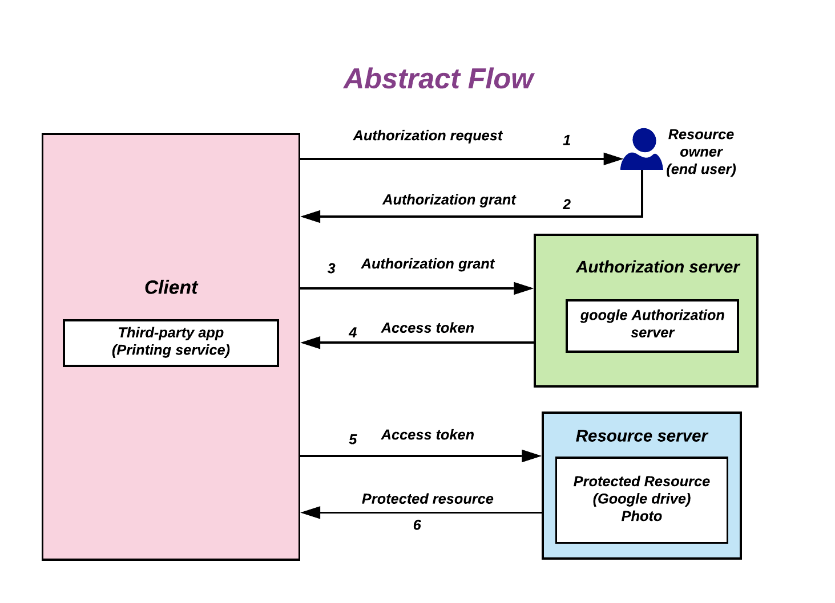
Figure 1: flow
This is used for a limited access by third-party through HTTP by issuing an access token to them.
It can
- Granting partial authorizations with a special access tokens.
- Connect accounts.
- Login with other accounts.
8. Browser
8.1. Local Storage
- Simple Per-page key-value storage that is persistent.
- Set with
localStorage.setItem(string key, string value)and get withlocalStorage.getItem(string key) -> string valuein 2.
9. Examples
9.1. Excalidraw
Based on React
9.1.1. Export
exportCavas(type, elements, appState, fijles, {...})
in excalidraw.com/packages/excalidraw/data/index.ts is the function that
handles all exports.
The type of elements is hidden in the excalidraw.com/packages/element/types
which is not visible to the user.